

The McDonald's Screen That Lies (And Why Your System Probably Does Too)
The system works. The screen works. The data flows. Everybody is using it, and it's still useless. One of the most common, and most expensive, failure modes in operational software.
Heartbyte Team
Engineering & Strategy
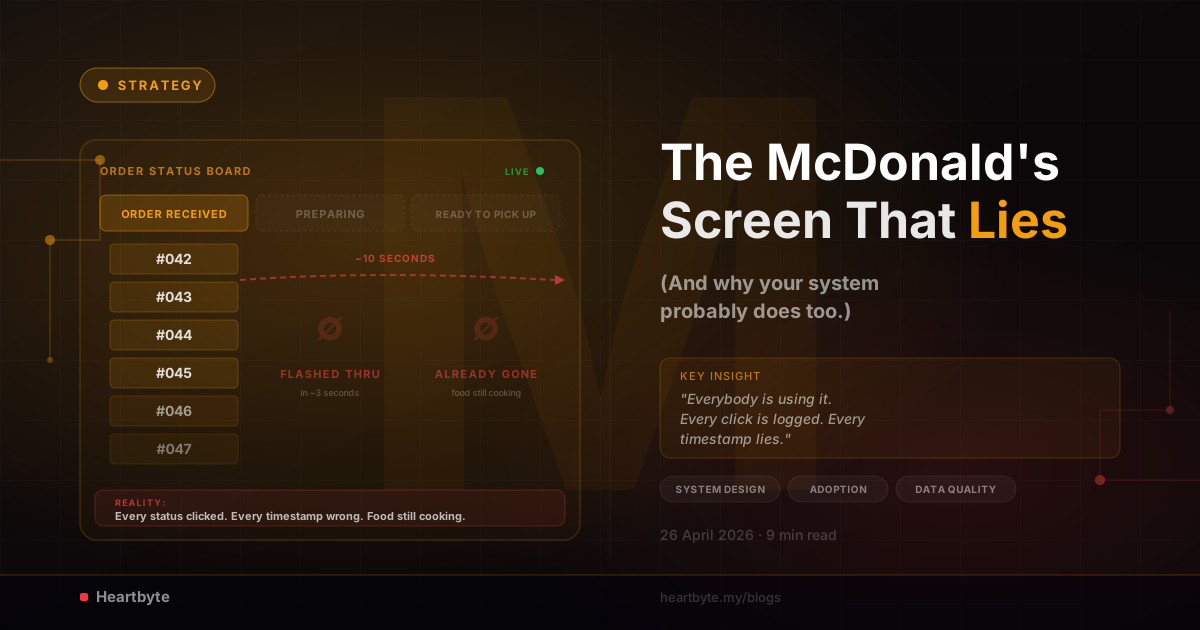
Walk into almost any McDonald's in Malaysia and look at the screen above the counter. Three columns: Order Received, Preparing, Ready to Pick Up. Bright, clean, well-designed. Order numbers flash through the stages. Customers know exactly where their food is. Management knows exactly how long every order takes from receipt to handover.
That's the theory. Now look at what actually happens.
You order at the kiosk. Number 042 prints. You watch the screen, and there it is: #042 sitting in Order Received. A few seconds later it slides into Preparing. A few seconds after that, it's in Ready to Pick Up. Then it's gone, cleared off the screen. The whole thing took maybe ten seconds. You stand at the counter another four minutes waiting for the food to actually show up. The screen moved on without you a long time ago.
"A system that's running but not working is worse than a system that doesn't exist. At least the broken one is honest about it."
The system is technically alive. It logs timestamps. It spits out reports. Every order moves through every stage like clockwork. But the timestamps don't match reality. They just record how fast someone pressed the buttons. The data is made up, the reports are for show, and the whole point of the screen is gone. This isn't a fast-food problem. You'll see the same thing inside companies of every size, running tools that cost millions to build.
A note before we go further: what follows is a personal observation from my own visits to McDonald's outlets in Malaysia, as a paying customer. It is not based on any insider knowledge of McDonald's operations, training, staffing, or systems — only on what anyone standing at the counter can see for themselves. The brand and chain are used here as a familiar real-world example; the broader lesson is about how operational systems get adopted and silently defeated, and it applies far beyond fast food.
What the System Was Supposed to Do
Forget the screen for a second and look at the idea behind it. McDonald's order tracking has three jobs, and all three are worth doing.
The three jobs of the screen:
Tell customers where their order is
No more crowding the counter. No more "is it ready yet?" The screen says: yes, it's ready, come collect.
Give management cycle-time data
How long from order received to delivered? Average prep time? Outliers by hour, by store, by day? You can't improve what you can't measure.
Force operational discipline
When staff have to update status, they think about status. The flow becomes visible. Bottlenecks surface instead of hiding.
All three jobs are real. None of them are happening at the McDonald's I'm describing. The system works fine. It was just built on the assumption that people would use it the way it's meant to be used. They don't.
What's Actually Happening
The twist that makes this so hard to spot is that the staff are using the system. Every order touches every status. Order Received, click. Preparing, click. Ready to Pick Up, click. Done. Look at the data and adoption is perfect. The compliance report would be glowing.
The problem isn't whether the buttons get pressed. It's when. All the status updates happen in the first few seconds after the order comes in, long before the kitchen has cooked anything. By the time the food is ready and handed over, the order has already dropped off the screen. It was logged as "delivered" three or four minutes ago.
Why does this happen? Because if you're a busy staff member, the easiest way to deal with the screen is to get it out of the way upfront. Click everything once when the order comes in, then forget it. No need to come back to it later when you're juggling drinks, fries, ten other orders, and a queue. The screen turns into a quick chore at the start of each order, not a live picture of what's actually cooking.
And nothing pushes back. The system records the timestamps without complaint. The dashboard shows lovely, fast cycle times. Speed-of-service numbers look great. Nobody gets flagged because there's nothing odd to flag. The data all adds up, it just has nothing to do with reality. The work and the data have come apart, and no alarm goes off when they do.
"Staff didn't break the system. They made it tell management exactly what management was measuring."
This is the part that's hardest for people who design systems to accept. The staff aren't being lazy, and they're not sabotaging anything. They're being smart. They do what any worker does when the tool gets in the way of the job: deal with the tool as fast as possible and get on with the real work. And they'll keep doing that, in every system and every industry, until something basic about the design changes.
The Three Casualties
When a tracking system gets used like this, fully clicked, fully logged, and fully wrong, three groups lose out. None of them notice straight away. By the time they do, the damage runs deep.
The customer loses visibility
The whole point of the screen is so customers don't have to ask "where's my food?" When orders flash through every stage in seconds and vanish before the food is ready, the customer is right back where they started: at the counter, asking staff, hoping their food turns up. The screen is just furniture now. It works, but it's useless.
Management loses data
Look at the dashboard. Average order time: 12 seconds. Wow, our kitchen is fast! Except the kitchen takes the same four to seven minutes it always did. The 12 seconds is just how long it takes a staff member to click through every status button at the start of an order. The numbers add up but they mean nothing. Every decision based on them, from staffing to capacity planning to performance reviews, is a decision based on made-up data.
The system loses purpose
The longer this goes on, the more people inside the company stop trusting the system. Managers see the dashboard, realise the numbers don't match reality, and stop opening it. Engineers see no one cares about the data and stop bothering to improve it. Eventually someone says "let's replace this with something better." A new system gets built. Six months later the same thing happens to that one. Round and round it goes.
Why This Pattern Repeats Everywhere
This isn't a McDonald's problem or a fast-food problem. It's what happens when systems meet real people, and you'll find the same pattern in:
The same failure, different industry:
- ▸ CRMs where every lead is marked "contacted" the moment it's imported, regardless of whether anyone called.
- ▸ Project management tools where every task gets moved to "in progress" and then immediately to "done" because nobody updates the middle states.
- ▸ Inventory systems where stock is "received" the moment a PO is raised, before the goods physically arrive at the warehouse.
- ▸ Ticketing systems where every ticket is closed within the SLA window because keeping it open hurts the metric.
- ▸ Quality checklists where every box is ticked before the work has actually been verified, because un-ticked boxes get the auditor's attention.
It's the same story every time. The system has multiple states for good reasons, and updating each one at the right moment takes attention, memory, and discipline. But staff are judged on results that don't care when each state was updated. So they batch the updates, all at the start or all at the end, whatever's easiest, and the timestamps stop matching reality. The system records made-up data, management makes decisions on it, and the whole thing rots in plain sight.
"A system isn't useful because it exists. It's useful because the data inside it matches reality."
The Real Failure Wasn't Technical
This is the part technical teams find hard to swallow: the system isn't broken. The code works. The database is fine. The screen loads. The API is fast. By every technical measure, the system is healthy. What failed was the design of the work around the system. Three things got missed.
The status wasn't tied to physical events
If a person has to remember to come back to the screen three times per order, when prep starts, when it's plated, and when it's handed over, they won't. They'll click everything once at the start and move on. Each status needed to be tied to a physical thing that has to happen anyway. Kitchen accepts the order, status moves on its own. Food hits the warming bay, status moves on its own. Counter scans the receipt on the way out, status moves to delivered. Manual updates should be the exception, not the rule.
The incentive wasn't aligned
Staff don't get rewarded for accurate status updates. They get rewarded for fast service. As long as those two things are separate, status updates are the first thing to go when the queue gets long. If accurate data actually matters, it has to show up in performance reviews, or better yet, be automated so no human has to think about it.
The "why" was never explained
Most floor staff have no idea what the screen is for. Nobody told them. They see a screen, they see buttons, they see no difference to their day, so they treat it as extra work. If they knew customers rely on it, that the data is used to make their jobs better, and that the system is for them as much as for management, things would change overnight. People rarely sabotage a tool when they get why it's there.
What Good Looks Like
The fix isn't a nicer screen, more training, or a stern memo from management. You have to redesign how the system fits into the work, around one simple rule:
"The easiest path through the workflow must also be the correct one."
If the only way to fulfil an order is to scan it at three points, when it's received, when prep is done, and when it's handed to the customer, and each scan updates the status on its own, the data is right by default. There's no shortcut. Skipping the system would take longer than using it. That's the target.
When the system is invisible in the workflow, when staff are just doing their jobs and the screen quietly shows what's happening, adoption isn't even a question. There's nothing to skip. The data comes out of the work itself, not from an extra task piled on top.
"The best operational systems are the ones staff don't realise they're using."
That's the bar. Anything less and you're building a system that runs on staff goodwill, attention, and spare time, all of which vanish the moment things get busy.
The Test for Your Own Systems
If you've got an internal system right now, a CRM, an ERP, a dashboard, or a custom tool, ask three questions. The answers will tell you whether you've got a real system or an expensive show.
Question 1
Is the data inside it actually true?
Pull a random sample. Does the system's version of reality match what's actually happening on the ground? If you're not sure, you have your answer.
Question 2
What does it cost staff to keep the data accurate?
If the answer is "extra time and attention they don't get rewarded for," your data is decaying as we speak.
Question 3
What happens if staff stop updating it tomorrow?
If everything keeps running and nobody notices, the system is already optional, and it's only a matter of time before people stop bothering with it.
A system that needs staff goodwill to produce correct data is living on borrowed time. The goodwill always runs out, usually right when you need the data most.
Bottom Line
The McDonald's screen wasn't a software failure. It was a workflow failure dressed up as a software win. The system was built, deployed, and "live." The dashboard was glowing. The technical team did everything they were asked to do.
But the system was built on the assumption that people would use it the way it was meant to be used. They didn't. They used it the way that got it out of the way of their real job. And once that habit set in, the system became an expensive show, running and recording and reporting made-up data all day long.
If you're building or buying an internal system, the first question isn't "what does it do?" It's "what happens when the people using it are tired, busy, and looking for the fastest way to get through it?" Because they will be. They'll click everything upfront, batch every status change, and tick every box without checking, anything to make the system stop nagging them. If your system can't survive that, it doesn't matter how good the code is.
"A glowing dashboard isn't proof the system works. It's only proof that someone, somewhere, ticked the boxes."
Building a system that won't quietly become theatre?
We design custom systems where accurate data is a byproduct of work, not an extra task on top of it. Workflow-first thinking, zero change request fees, and adoption built in from day one.
Talk to Us About Your ProjectHeartbyte Team
Heartbyte is a bespoke software development company based in Malaysia. We build web, mobile, and custom software for ambitious businesses, with 15+ years of combined engineering experience and zero change request fees, guaranteed.